Showing posts with label how-to. Show all posts

Monday, January 17, 2011

Odesk Sign Up

Want to apply for jobs on oDesk? Not sure how or where to sign up? Just follow the steps below.

Step 1 Click this big blue banner. You will be redirected to my profile page.

The On Demand Global Workforce - oDesk

Step 2 Next look for a yellow button that says Create an Account. You can find it on the upper right of the page and it looks like this.

Odesk Freelancer

Step 3 Next you will see this.

Choose Freelance Provider if you signed up to become an oDesk freelancer. Choose Buyer if you are planning to outsource jobs to oDesk freelancers. Choose Provider Company if your plan is to create a group of providers or oDesk freelancers that will work as a team.

Odesk Freelancer

Step 4 Next you will be asked to fill up a form and that's it. All that is left for you to do is create your profile and take some tests and you are all set.

Wednesday, June 30, 2010

Need Help With Your Profile?

Note: This post is for those who just registered on Odesk.

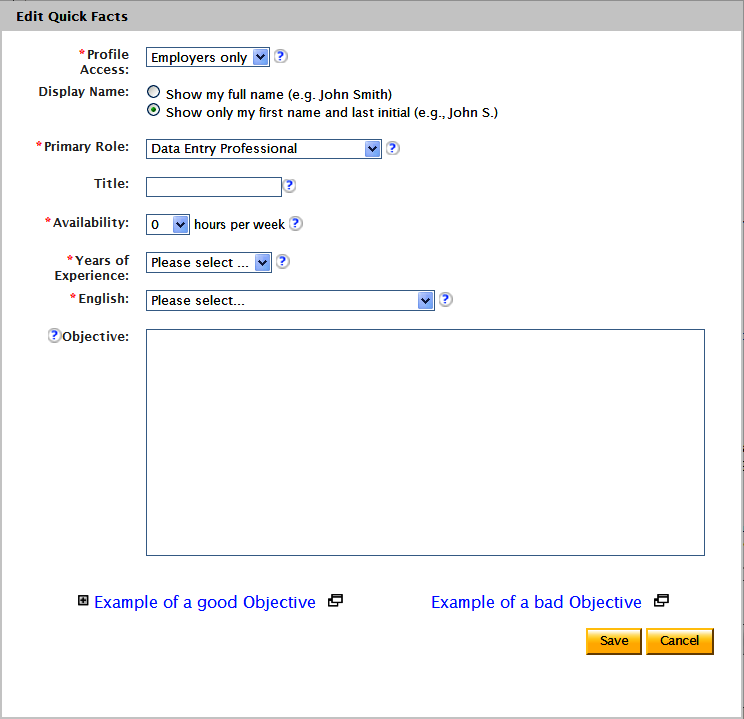
If you are not sure what to put in your profile page, I can help! Let's go over your profile page real quick.

First go to your Profile Settings.
Look for My Contract Profile on your left.
Click Edit.

The form below is what you will see next.


1. Profile Access
  1. Public
  2. Employers only
  3. Private
If you want your profile to be made public, choose option 1 from the drop down (highly recommended).

If you want your profile to be visible only to employers, choose Employers only.

If you want to hide your profile, choose Private. Profiles that are made private don't get included in search results.

2. Primary Role

Choose which describes you best as a freelancer.

Consultant
Data Entry Professional
Programmer/Developer
Project Manager
QA Engineer/Tester
System/Database Administrator
Technical Writer
Website/Graphic Designer

3. Title

Think of a three or four-word title that would grab people's attention. Ask yourself, what best describes you and the services you got to offer? Make sure what you put in the title is spelled correctly and in titlecase.

4. Availability. How many hours per week are you available for work?

5. Odesk Ready? You have to take the oDesk Readiness test before you can apply for jobs. I suggest you take the following tests as well:

U.S. English Basic Skills Test
U.S. Word Usage Test
English Vocabulary Test (U.S. and Non-U.S. Version)
Office Skills Test
English Spelling Test (U.S. and Non-U.S. Version)

6. Years of Experience No need to explain this one. Just be honest and fill out this part like you would when applying for an outside job.

7. English. This part is self-assessed. If you can speak and write English fluently, give yourself 5 stars. If you are not too confident with your English skills, go for 3-4 stars.

8. Objective. This part is the most important. Don't just copy what you see on other people's profile. Highlight your skills. Talk about what you can do if you ever get hired. Talk about what you are good at. Talk about your work ethics, your work experiences but never ever say things that you aren't.

Hope this help!

Leave comments if you have any questions.

Friday, May 7, 2010

Signing Up on Odesk Made Easy

I decided to do another post to make sure everybody who is interested to sign up for an oDesk account gets it right the first time. If you do sign up and would like a bit of help with your cover letter or with doing a job search, it would be best if you join our Facebook group. Just do a search on Facebook. Search for "There's Money in oDesk" to join.

Step 1
Click this big blue banner. You will be redirected to my profile page.

The On Demand Global Workforce - oDesk

Step 2 Next look for a yellow button that says Create an Account. You can find it on the upper right of the page and it looks like this.

Odesk Freelancer


Step 3 Next you will see this.

Choose Freelance Provider if you signed up to become an oDesk freelancer. Choose Buyer if you are planning to outsource jobs to oDesk freelancers. Choose Provider Company if your plan is to create a group of providers or oDesk freelancers that will work as a team.

Odesk Freelancer

Step 4 Next you will be asked to fill up a form and that's it. All that is left for you to do is create your profile and take some tests and you are all set.

Monday, May 3, 2010

Outsourcing Jobs on oDesk

If you have been wanting to outsource a variety of jobs but don't know how it works then you came to the right place to look for info. Do you want article writers to write short articles for you? Are you looking for data entry experts to upload pics on your Amazon or on your eBay account? Are you looking for live chat agents to do live chat and email support for you? Or are you looking for computer programmers maybe?


Outsourcing jobs has never been easier. Just click the blue banner and sign up for an oDesk account.

The On Demand Global Workforce - oDesk

It will take you to my profile page. On the upper right, look for a big yellow button that says Create an Account.

Pick Buyer - I want to post a job.

Then you will be taken to the registration page. Just fill out the form to sign up. When you are done, you can start outsourcing jobs.
Related Posts Plugin for WordPress, Blogger...

How to Sign up

If you are interested to become a freelancer, just click my referral banner and you will be redirected to my profile page. Click SIGN UP, fill out the form and then submit. That's it! If you have questions, you can leave a comment and I will get back to you.

The On Demand Global Workforce - oDesk